Subscribe on AWS Marketplace
Pick Small or Growth, or ask for a private offer. Billing goes on your AWS invoice.
Launch the Quick Launch stack
It creates one IAM role with the permissions you enable and gives you a link back to Runless.
Pick schedules
Runless checks the role, lists your ECS services and EC2 instances, and runs the schedules you set.
ECS and EC2 schedules · on AWS Marketplace
Stop paying for dev environments while your team sleeps
Runless stops your ECS services and EC2 instances in the evening and starts them again before work. You add one IAM role to your AWS account, and billing goes on your AWS invoice.
Already subscribed? Sign in

- One IAM role in your accountCreated by one CloudFormation stack. Nothing to run or patch.
- EC2: tagged instances onlyStop and start are allowed only on instances tagged
runless:managed=true, enforced by IAM. - ECS: the clusters you nameOptionally limit service updates to up to 10 named clusters.
- Billed on your AWS invoiceBought on AWS Marketplace; counts toward committed spend.
- About 20 minutes to set upQuick Launch from the Marketplace listing.
What would Runless save you?
Applies to compute billed per hour while it runs, such as Fargate tasks and EC2 instance hours. EBS volumes, load balancers and NAT gateways keep billing while resources are stopped. The math is the same as the estimate in the Runless dashboard.
What you get
Example data, not a real account.
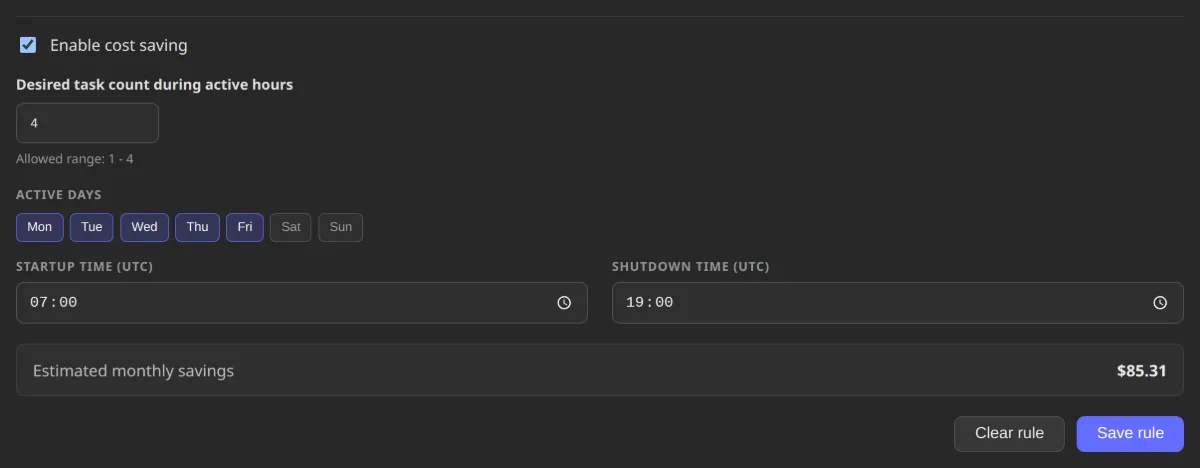
See the saving before you save the rule
Pick working days and hours for a service, an instance, a whole ECS cluster or a region. The estimate updates as you edit, from the resource's own AWS price.
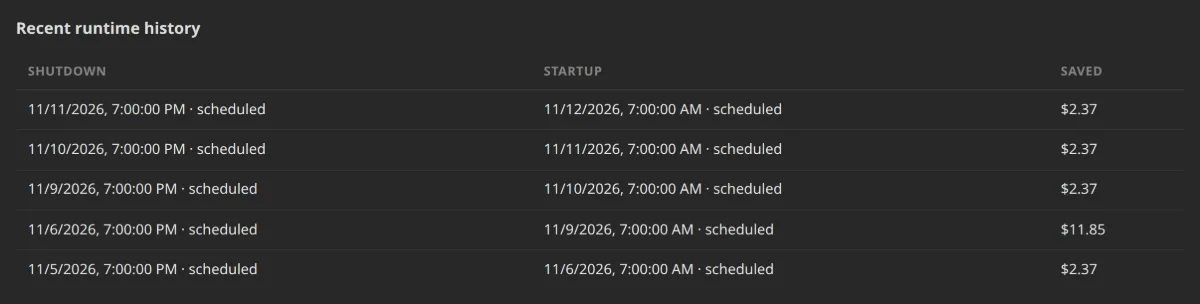
Every stop is on the record
Each scheduled or manual shutdown is logged with when it stopped, when it came back and what it saved. The total at the top of the dashboard adds up those real stops, not the estimate.
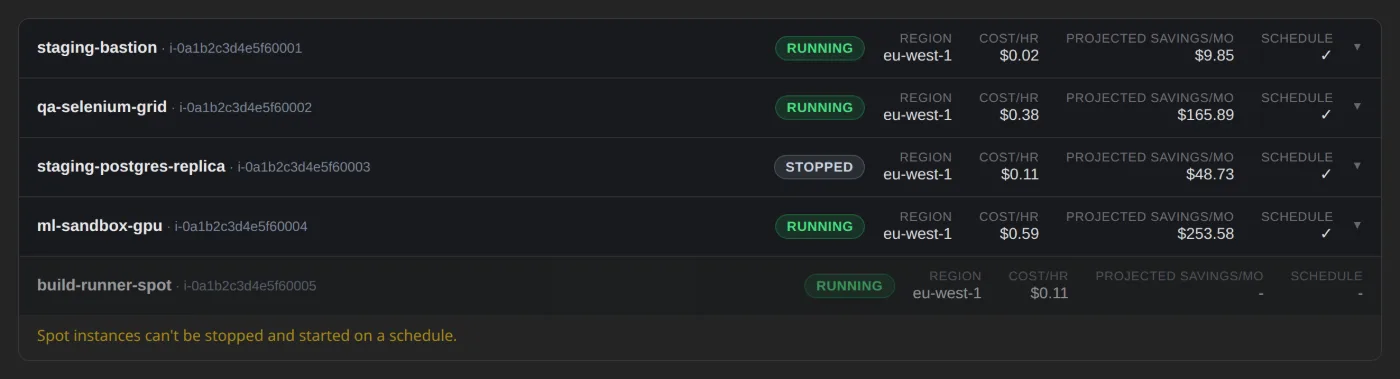
It only touches what you picked
Spot instances, Auto Scaling group members and instances with instance-store volumes are listed but never scheduled, and EC2 needs the runless:managed=true tag. For anything else, start or stop a single service or a whole cluster by hand from the same screen.
How Runless Works
From subscription to the first scheduled stop
Pricing
SaaS plans built for multitenant AWS operations
Small
$49/tenant/month
- Up to 3 connected AWS environments
- Up to 5 users
- Core automation and schedule management
- Team access with owner/member roles
- Cost analytics dashboard
- Standard support
Growth
$99/tenant/month
- Up to 10 connected AWS environments
- Up to 20 users
- Everything in Small
- Expanded operational coverage
- Standard support
Custom
Custompricing
- All features in Growth
- Higher environment and seat limits
- Custom integrations
- Priority support
- Tailored packaging for your organization
Buying: Runless is billed through your existing AWS invoice - it counts toward committed spend and EDP, with no separate vendor onboarding. Want to try it with your team first? Ask about a pilot.
Billing: Plans are billed per tenant with environment and seat limits. A connected AWS environment means one AWS account in one region. Contact us for a private offer with custom terms and annual commitments.
Pilot Program
Prove it out before you commit, billed through a private offer
Want to see Runless on your own dev or staging environment first? Connect one AWS account, we help you set up schedules for a real workload and issue an AWS Marketplace private offer for the pilot, with terms that carry over into your subscription.
Where Teams Use It
- Stop Paying for Idle Dev and Staging Environments →Development and QA environments that run 24/7 but are only used during business hours.
- ECS Service Scheduling →Scale non-production ECS services to zero outside business hours.
- EC2 Instance Scheduling →Stop non-production EC2 instances automatically outside business hours.
- How Runless Compares →Honest comparisons against the other ways to manage AWS resource scheduling.
Frequently Asked Questions
Does this affect production environments?
No. Runless is designed for non-production environments like development, staging and QA. We recommend keeping production environments in a separate account and always on.
How secure is Runless?
Security is our top priority. Runless assumes a dedicated cross-account role with least-privilege permissions and external ID protection. All actions are logged and traceable. Your long-lived AWS credentials never leave your account.
Can I override schedules manually?
Absolutely! Every ECS service or EC2 instance can be manually turned on or off at any time, regardless of the schedule, individually or in bulk for a cluster/region. This is perfect for emergency access, late-night deployments or unexpected work sessions.
What AWS permissions are required?
Runless requires access through the onboarding role to list and describe supported resources (ECS services and EC2 instances today), update their running state, and configure EventBridge forwarding for their runtime events. Access is split into per-service grants, so you can enable only the resource types you use. The Quick Start stack provisions the role policy and trust relationship.
How do I buy Runless?
Subscribe to Runless on AWS Marketplace. Billing flows through your existing AWS invoice - no separate contract or vendor onboarding, and it counts toward committed spend and EDP.
How long does setup take?
Most teams are up and running in under 20 minutes. Launching Quick Start usually takes 10-15 minutes, and account linking plus verification in the Runless portal takes a few additional minutes.
How is commercial access validated?
After your AWS account is linked and role verification succeeds, Runless reconciles the account against your AWS Marketplace subscription status. If access is pending or inactive, the account remains visible but restricted until commercial access is active.
How do team members get access?
Runless uses tenant-level team management. Owners can invite members, assign roles, and remove users directly from the dashboard without managing a separate Cognito user pool.
Is there a free trial?
There's no free trial - plans are purchased on AWS Marketplace. If you want to prove it out on a real environment first, ask about a Pilot: a scoped engagement priced as a private offer, with terms that carry over into your ongoing subscription.
Can I get custom terms or an annual commitment?
Yes - we issue AWS Marketplace private offers for custom pricing, higher limits, and annual commitments. Reach out at contact@cloudsoft.com.pl.
How do you calculate savings?
Savings are calculated from each resource's AWS pricing (CPU/memory for ECS services, instance type for EC2) and running time. The dashboard shows actual costs saved by tracking when resources are stopped versus when they would have been running.
About CloudSoft
Runless is developed and maintained by CloudSoft, a professional software development company specializing in cloud solutions, serverless architectures and modern services.
Visit www.cloudsoft.com.pl to learn more about our services and expertise in AWS cloud consulting.